Diberdayakan oleh Blogger.
Tampilkan postingan dengan label komputer. Tampilkan semua postingan
Jumat, 12 Juli 2013

Computer Software Engineer

Because computers are so important to our lives, there is a constant need to develop new software. Computer software engineers apply computer science, engineering, and math to design, develop, and test software. (Computer hardware engineers design computer chips, boards, systems, modems, and printers.)
Software engineers first analyze users' needs. Then they design, construct, test, and maintain the needed software or systems. In programming, or coding, they tell a computer, line by line, how to function. They also solve any problems that arise. They must possess strong coding skills, but are more likely to develop algorithms and solve problems than write code.
Software engineers often work as part of a team that designs new hardware, software, and systems. A core team may have engineering, marketing, factory, and design people who work together until the product is done.
Computer applications software engineers design, construct, and maintain computer programs based on what people need. They can develop a program for just one person or for many people to use separately.
Computer systems software engineers construct and maintain computer programs for companies. For example, they might develop programs that do recordkeeping and payroll. They might also set up an "intranet"—an internal and secure computer network—for a company. Many software engineers work for companies that make or install new and more advanced computer systems.
Software engineers normally work in well-lighted offices or labs. Most work at least 40 hours a week. If a big project is due, they may have to work nights or weekends to meet deadlines. Like other workers who sit for hours at a computer, they are susceptible to eyestrain, back ache, and hand and wrist pain.
Software engineers who are employed by vendors and consulting firms spend time away from their offices to meet with customers. As networks expand, they may be able to use modems, laptops, e-mail, and the Internet to identify and fix problems from their own office.
HOW DO YOU GET READY?
Most employers prefer to hire people who have at least a college degree and experience with a variety of computer systems. Students seeking software engineering jobs can improve their chances by signing up as interns to get some experience. Large firms that can train new hires may take new grads with no experience.
Persons looking at jobs in this field must have strong problem-solving skills. They also must be able to work with team members, other staff, and customers. Because they often deal with many tasks at the same time, they must be able to focus and pay close attention to detail.
As technology advances in the computer field, employers want workers to keep up. Software engineers must learn new skills if they wish to remain in this advancing field. To help them keep up, employers, vendors, private training schools, and others offer a large number of courses.
HOW MUCH DOES THIS JOB PAY?

Average yearly wages for computer applications software engineers were $87,900 in May 2008. Average yearly wages for computer systems software engineers were $94,520.
HOW MANY JOBS ARE THERE?

Computer applications software engineers held about 514,800 jobs in 2008, while computer systems software engineers held about 394,800. Although they have jobs in most industries, many computer software engineers work in computer systems design and related services. Employers range from startups to well-known industry leaders. A growing number of these workers get jobs on a temporary basis, or work as consultants.
WHAT ABOUT THE FUTURE?

Both computer applications software engineers and computer systems software engineers are projected to be among the fastest growing occupations from 2008 to 2018. Rapid growth in the computer systems design industry should mean good opportunities for college grads with a degree and some experience. Employers will look for software engineers with a strong background in programming and systems analysis, along with business and people skills.
The number of computer software engineers is expected to rise much faster than the average, as businesses are looking for new ways to get ahead of competition and make their computer systems the fastest. Also, growing concerns over "cyber security"—making sure only certain people can see private information—will mean more jobs for these engineers. Job growth will not be as fast as during the last decade because some work is outsourced to foreign countries.
fendikiber komputer

Parts of a computer

Parts of a computer

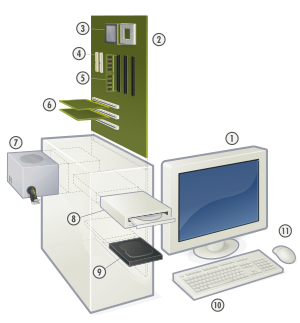
If you use a desktop computer, you might already know that there isn't any single part called the "computer." A computer is really a system of many parts working together. The physical parts, which you can see and touch, are collectively calledhardware. (Software, on the other hand, refers to the instructions, or programs, that tell the hardware what to do.)
The illustration below shows the most common hardware in a desktop computer system. Your system may look a little different, but it probably has most of these parts. A laptop computer has similar parts but combines them into a single notebook-sized package.
Picture of a desktop computer system
Desktop computer system
Let's take a look at each of these parts.

System unit

The system unit is the core of a computer system. Usually it's a rectangular box placed on or underneath your desk. Inside this box are many electronic components that process information. The most important of these components is the central processing unit (CPU), or microprocessor, which acts as the "brain" of your computer. Another component is random access memory (RAM), which temporarily stores information that the CPU uses while the computer is on. The information stored in RAM is erased when the computer is turned off.
Almost every other part of your computer connects to the system unit using cables. The cables plug into specific ports(openings), typically on the back of the system unit. Hardware that is not part of the system unit is sometimes called aperipheral device or device.
Picture of a system unit
System unit

Storage

Your computer has one or more disk drives—devices that store information on a metal or plastic disk. The disk preserves the information even when your computer is turned off.

Hard disk drive

Your computer's hard disk drive stores information on a hard disk, a rigid platter or stack of platters with a magnetic surface. Because hard disks can hold massive amounts of information, they usually serve as your computer's primary means of storage, holding almost all of your programs and files. The hard disk drive is normally located inside the system unit.
Picture of a hard disk drive
Hard disk drive

CD and DVD drives

Nearly all computers today come equipped with a CD or DVD drive, usually located on the front of the system unit. CD drives use lasers to read (retrieve) data from a CD, and many CD drives can also write (record) data onto CDs. If you have a recordable disk drive, you can store copies of your files on blank CDs. You can also use a CD drive to play music CDs on your computer.
Picture of a CD
CD
DVD drives can do everything that CD drives can, plus read DVDs. If you have a DVD drive, you can watch movies on your computer. Many DVD drives can record data onto blank DVDs.

Tip

  • If you have a recordable CD or DVD drive, periodically back up (copy) your important files to CDs or DVDs. That way, if your hard disk ever fails, you won't lose your data.

Floppy disk drive

Floppy disk drives store information on floppy disks, also called floppies or diskettes. Compared to CDs and DVDs, floppy disks can store only a small amount of data. They also retrieve information more slowly and are more prone to damage. For these reasons, floppy disk drives are less popular than they used to be, although some computers still include them.
Picture of a floppy disk
Floppy disk
Why are floppy disks "floppy"? Even though the outside is made of hard plastic, that's just the sleeve. The disk inside is made of a thin, flexible vinyl material.

Mouse

A mouse is a small device used to point to and select items on your computer screen. Although mice come in many shapes, the typical mouse does look a bit like an actual mouse. It's small, oblong, and connected to the system unit by a long wire that resembles a tail. Some newer mice are wireless.
Picture of a computer mouse
Mouse
A mouse usually has two buttons: a primary button (usually the left button) and a secondary button. Many mice also have a wheel between the two buttons, which allows you to scroll smoothly through screens of information.
Picture of mouse pointers
When you move the mouse with your hand, a pointer on your screen moves in the same direction. (The pointer's appearance might change depending on where it's positioned on your screen.) When you want to select an item, you point to the item and then click (press and release) the primary button. Pointing and clicking with your mouse is the main way to interact with your computer. For more information, see Using your mouse.

Keyboard

A keyboard is used mainly for typing text into your computer. Like the keyboard on a typewriter, it has keys for letters and numbers, but it also has special keys:
  • The function keys, found on the top row, perform different functions depending on where they are used.
  • The numeric keypad, located on the right side of most keyboards, allows you to enter numbers quickly.
  • The navigation keys, such as the arrow keys, allow you to move your position within a document or webpage.
Picture of a keyboard
Keyboard
You can also use your keyboard to perform many of the same tasks you can perform with a mouse. For more information, seeUsing your keyboard.

Monitor

monitor displays information in visual form, using text and graphics. The portion of the monitor that displays the information is called the screen. Like a television screen, a computer screen can show still or moving pictures.
There are two basic types of monitors: CRT (cathode ray tube) monitors and LCD (liquid crystal display) monitors. Both types produce sharp images, but LCD monitors have the advantage of being much thinner and lighter. CRT monitors, however, are generally more affordable.
Picture of an LCD monitor and a CRT monitor
LCD monitor (left); CRT monitor (right)

Printer

A printer transfers data from a computer onto paper. You don't need a printer to use your computer, but having one allows you to print e‑mail, cards, invitations, announcements, and other materials. Many people also like being able to print their own photos at home.
The two main types of printers are inkjet printers and laser printers. Inkjet printers are the most popular printers for the home. They can print in black and white or in full color and can produce high-quality photographs when used with special paper. Laser printers are faster and generally better able to handle heavy use.
Picture of an inkjet printer and a laser printer
Inkjet printer (left); laser printer (right)

Speakers

Speakers are used to play sound. They may be built into the system unit or connected with cables. Speakers allow you to listen to music and hear sound effects from your computer.
Picture of computer speakers
Computer speakers

Modem

To connect your computer to the Internet, you need a modem. A modem is a device that sends and receives computer information over a telephone line or high-speed cable. Modems are sometimes built into the system unit, but higher-speed modems are usually separate components.
Picture of a cable modem
Cable modem
fendikiber komputer

Computer hardware


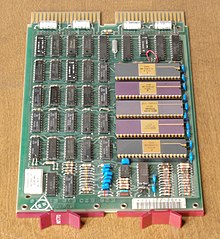
 is the collection of physical elements that constitute a computersystem. Computer hardware refers to the physical parts or components of a computer such as monitor, keyboard, Computer data storage, hard drive disk, mouse, CPU (graphic cards, sound cards, memory, motherboard and chips), etc. all of which are physical objects that you can actually touch. In contrast, software is untouchable. Software exists as ideas, application, concepts, and symbols, but it has no substance. A combination of hardware and software forms a usable computing system.

See also[edit]

fendikiber komputer

pengertian komputer


Komputer adalah alat yang dipakai untuk mengolah data menurut proseduryang telah dirumuskan. Kata computer semula dipergunakan untuk menggambarkan orang yang perkerjaannya melakukan perhitungan aritmatika, dengan atau tanpa alat bantu, tetapi arti kata ini kemudian dipindahkan kepada mesin itu sendiri. Asal mulanya, pengolahan informasi hampir eksklusif berhubungan dengan masalah aritmatika, tetapi komputer modern dipakai untuk banyak tugas yang tidak berhubungan dengan matematika.
Dalam arti seperti itu terdapat alat seperti slide rule, jenis kalkulator mekanikmulai dari abakus dan seterusnya, sampai semua komputer elektronik yang kontemporer. Istilah lebih baik yang cocok untuk arti luas seperti "komputer" adalah "yang mengolah informasi" atau "sistem pengolah informasi." Selama bertahun-tahun sudah ada beberapa arti yang berbeda dalam kata "komputer", dan beberapa kata yang berbeda tersebut sekarang disebut disebut sebagai komputer.
Kata computer secara umum pernah dipergunakan untuk mendefiniskan orang yang melakukan perhitungan aritmatika, dengan atau tanpa mesin pembantu. Menurut Barnhart Concise Dictionary of Etymology, kata tersebut digunakan dalam bahasa Inggris pada tahun 1646 sebagai kata untuk "orang yang menghitung" kemudian menjelang 1897 juga digunakan sebagai "alat hitung mekanis". Selama Perang Dunia II kata tersebut menunjuk kepada para pekerja wanita Amerika Serikat dan Inggris yang pekerjaannya menghitung jalan artileri perang dengan mesin hitung.
Charles Babbage mendesain salah satu mesin hitung pertama yang disebut mesin analitikal. Selain itu, berbagai alat mesin sederhana seperti slide rulejuga sudah dapat dikatakan sebagai komputer.

Daftar isi

  [sembunyikan
fendikiber komputer

backgrounds


Collaborating since 1982, Leonard and Baker were originally signed to Mute Records in 1984 under the name I Start Counting [2] and continued with releases under the monikerFortran 5[3] until the release of Komputer’s debut album, The World of Tomorrow in (1998).
Simon Leonard and David Baker originally met at Middlesex University where they DJed together and, in 1982 began to collaborate on an electronic pop project, I Start Counting. Both had an abiding affection for pop music as well as a deep love of music in general, although Leonard specialised more in technology and David's bias was on the musical side. I Start Counting released two albums, and, in 1987, supported Erasure on a European tour.
In 1990 the new material they were working on was sounding quite different from their electro pop roots and it was decided that a new name, Fortran 5, would give the new dance/techno style a completely fresh start. The duo also began to collaborate with a number of other artists including DJ Colin Faver, Thrash of The Orb, Rod Slater of the Bonzos and Neil Arthur of Blancmange. Remixes were provided by the likes of Vince Clarke, Moby, Joey Negro, David Holmes and Pascal Gabriel, while the duo supplied remixes for other artists including Erasure, Inspiral Carpets and Laibach.
David and Simon then reacted to the tedium of mid 90's indie guitar music by returning to their Kraftwerk inspired roots which again provoked a name change.The band takes samples from a variety of sources: from Russian cosmonauts to rubbish compactors and mobile phone ringtones.
Komputer's first releases, the 'Komputer EP' and the subsequent album 'The World Of Tomorrow'; were a respectful homage to the duo's German electronic heroes. Later material saw Komputer absorbing a much wider variety of influences and creating their own unique style of English electronic pop/folk music.
The duo never performed live as Fortran 5, but from the earliest days as Komputer, live shows were very important, leading to many performances all over Europe, most recently appearing at the Short Circuit presents Mute festival at London’s Roundhouse.
For Synthetik, the band’s third album, the music gradually evolved over a long period of time, tracks were tried out in live sets then discarded or reworked in the studio, maturing into a return to the more traditional electro sound of the first album, The World Of Tomorrow, with the incorporation of a more experimental and contemporary electronica approach.
fendikiber komputer